PNMALIAS
NAME
pnmalias - antialias a portable anymap.
SYNOPSIS
      pnmalias [-bgcolor color] [-fgcolor color] [-bonly] [-fonly] [-balias]
      [-falias] [-weight w] [pnmfile]
DESCRIPTION
      Reads a portable anymap as input, and applies anti-aliasing to
      background and foreground pixels.  If the input file is a portable
      bitmap, the output anti-aliased image is promoted to a graymap, and a
      message is printed informing the user of the change in format.
OPTIONS
      -bgcolor colorb, -fgcolor colorf
           set the background color to colorb, and the foreground to color
           to colorf. Pixels with these values will be anti-aliased. by
           default, the background color is taken to be black, and
           foreground color is assumed to be white. The colors can be
           specified in five ways:
           o    A name, assuming that a pointer to an X11-style color names
                file was compiled in.
           o    An X11-style hexadecimal specifier: rgb:r/g/b, where r g and
                b are each 1- to 4-digit hexadecimal numbers.
           o    An X11-style decimal specifier: rgbi:r/g/b, where r g and b
                are floating point numbers between 0 and 1.
           o    For backwards compatibility, an old-X11-style hexadecimal
                number: #rgb, #rrggbb, #rrrgggbbb, or #rrrrggggbbbb.
           o    For backwards compatibility, a triplet of numbers separated
                by commas: r,g,b, where r g and b are floating point numbers
                between 0 and 1.  (This style was added before MIT came up
                with the similar rgbi style.) Note that even when dealing
                with graymaps, background and foreground colors need to be
                specified in the fashion described above.  In this case,
                background and foreground pixel values are taken to be the
                value of the red component for the given color.
      -bonly, -fonly
           Apply anti-aliasing only to background (-bonly), or foreground
           (-fonly) pixels.
      -balias, -falias
           Apply anti-aliasing to all pixels surrounding background
           (-balias), or foreground (-falias) pixels.  By default, anti-
           aliasing takes place only among neighboring background and
           foreground pixels.
      -weight w
           Use w as the central weight for the aliasing filter.  w must be a
           real number in the range 0 < w < 1.  The lower the value of w is,
           the "blurrier" the output image is.  The default is w = 1/3.
DEMONSTRATION
      Let a.pnm be a portable anymap.
      The following command will anti-alias it:
	pnmmerge pnmalias a.pnm >aalias.pnm
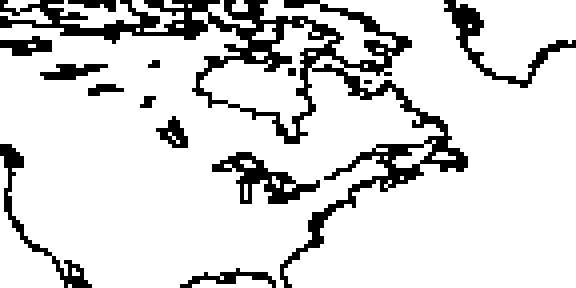
BEFORE
(magnified 4 times)
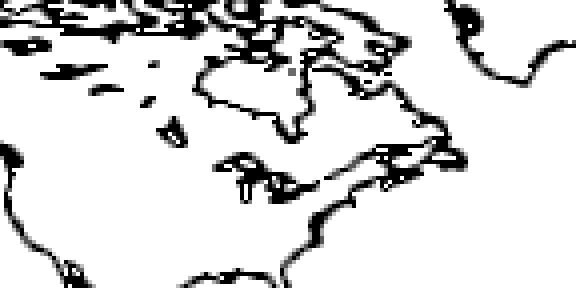
AFTER
-weight 0.333 (magnified 4 times)
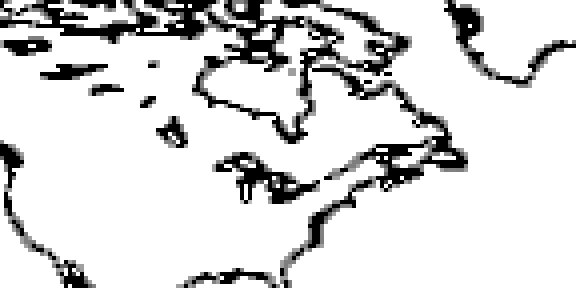
-weight 0.01 (magnified 4 times)
SEE ALSO
pbmtext(1), pnmsmooth(1), pnm(5)
AUTHOR
      Copyright (C) 1992 by Alberto Accomazzi, Smithsonian Astrophysical
      Observatory.