PNMNLFILT
NAME
      pnmnlfilt - non-linear filters: smooth, alpha trim mean, optimal
      estimation smoothing, edge enhancement.
SYNOPSIS
pnmnlfilt alpha radius [pnmfile]
DESCRIPTION
      This is something of a swiss army knife filter. It has 3 distinct
      operating modes. In all of the modes each pixel in the image is
      examined and processed according to it and its surrounding pixels
      values. Rather than using the 9 pixels in a 3x3 block, 7 hexagonal
      area samples are taken, the size of the hexagons being controlled by
      the radius parameter. A radius value of 0.3333 means that the 7
      hexagons exactly fit into the center pixel (ie.  there will be no
      filtering effect). A radius value of 1.0 means that the 7 hexagons
      exactly fit a 3x3 pixel array.
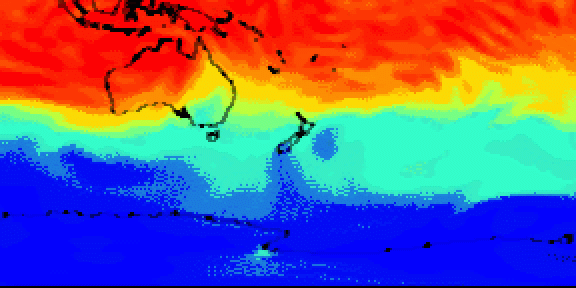
Alpha trimmed mean filter. (0.0 <= alpha <= 0.5)
      The value of the center pixel will be replaced by the mean of the 7
      hexagon values, but the 7 values are sorted by size and the top and
      bottom alpha portion of the 7 are excluded from the mean.  This
      implies that an alpha value of 0.0 gives the same sort of output as a
      normal convolution (ie. averaging or smoothing filter), where radius
      will determine the "strength" of the filter. A good value to start
      from for subtle filtering is alpha = 0.0, radius = 0.55 For a more
      blatant effect, try alpha 0.0 and radius 1.0
      An alpha value of 0.5 will cause the median value of the 7 hexagons to
      be used to replace the center pixel value. This sort of filter is good
      for eliminating "pop" or single pixel noise from an image without
      spreading the noise out or smudging features on the image. Judicious
      use of the radius parameter will fine tune the filtering. Intermediate
      values of alpha give effects somewhere between smoothing and "pop"
      noise reduction. For subtle filtering try starting with values of
      alpha = 0.4, radius = 0.6  For a more blatant effect try alpha = 0.5,
      radius = 1.0
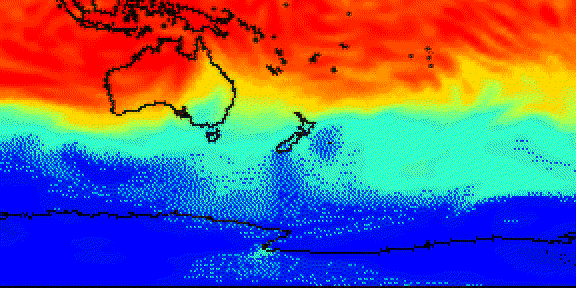
Optimal estimation smoothing. (1.0 <= alpha <= 2.0)
      This type of filter applies a smoothing filter adaptively over the
      image.  For each pixel the variance of the surrounding hexagon values
      is calculated, and the amount of smoothing is made inversely
      proportional to it. The idea is that if the variance is small then it
      is due to noise in the image, while if the variance is large, it is
      because of "wanted" image features. As usual the radius parameter
      controls the effective radius, but it probably advisable to leave the
      radius between 0.8 and 1.0 for the variance calculation to be
      meaningful.  The alpha parameter sets the noise threshold, over which
      less smoothing will be done.  This means that small values of alpha
      will give the most subtle filtering effect, while large values will
      tend to smooth all parts of the image. You could start with values
      like alpha = 1.2, radius = 1.0 and try increasing or decreasing the
      alpha parameter to get the desired effect. This type of filter is best
      for filtering out dithering noise in both bitmap and color images.
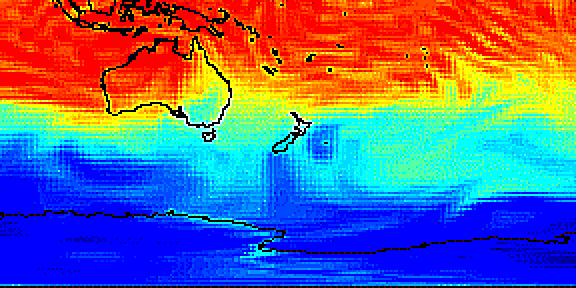
Edge enhancement.(-0.1 >= alpha >= -0.9)
      This is the opposite type of filter to the smoothing filter. It
      enhances edges. The alpha parameter controls the amount of edge
      enhancement, from subtle (-0.1) to blatant (-0.9). The radius
      parameter controls the effective radius as usual, but useful values
      are between 0.5 and 0.9. Try starting with values of alpha = 0.3,
      radius = 0.8
Combination use.
      The various modes of pnmnlfilt can be used one after the other to get
      the desired result. For instance to turn a monochrome dithered image
      into a grayscale image you could try one or two passes of the
      smoothing filter, followed by a pass of the optimal estimation filter,
      then some subtle edge enhancement. Note that using edge enhancement is
      only likely to be useful after one of the non-linear filters (alpha
      trimmed mean or optimal estimation filter), as edge enhancement is the
      direct opposite of smoothing.
      For reducing color quantization noise in images (ie. turning .gif
      files back into 24 bit files) you could try a pass of the optimal
      estimation filter (alpha 1.2, radius 1.0), a pass of the median filter
      (alpha 0.5, radius 0.55), and possibly a pass of the edge enhancement
      filter.  Several passes of the optimal estimation filter with
      declining alpha values are more effective than a single pass with a
      large alpha value.  As usual, there is a tradeoff between filtering
      effectiveness and loosing detail. Experimentation is encouraged.
References:
      The alpha-trimmed mean filter is based on the description in IEEE CG&A
      May 1990 Page 23 by Mark E. Lee and Richard A. Redner, and has been
      enhanced to allow continuous alpha adjustment.
      The optimal estimation filter is taken from an article "Converting
      Dithered Images Back to Gray Scale" by Allen Stenger, Dr Dobb's
      Journal, November 1992, and this article references "Digital Image
      Enhancement and Noise Filtering by Use of Local Statistics", Jong-Sen
      Lee, IEEE Transactions on Pattern Analysis and Machine Intelligence,
      March 1980.
      The edge enhancement details are from pgmenhance(1), which is taken
      from Philip R. Thompson's "xim" program, which in turn took it from
      section 6 of "Digital Halftones by Dot Diffusion", D. E. Knuth, ACM
      Transaction on Graphics Vol. 6, No. 4, October 1987, which in turn got
      it from two 1976 papers by J. F. Jarvis et. al.
DEMONSTRATION
      Let a.pnm be a portable anymap.
      The following command will apply the alpha trimmed mean filter
	pnmmerge pnmnlfilt a.pnm > atmean.pnm
BEFORE
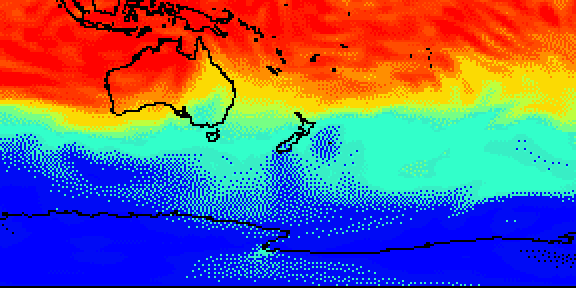
AFTER
alpha=0.5 radius=1.0 (alpha trimed mean filter)
alpha=1.8 radius=1.0 (optimal estimation smoothing)
alpha=-0.9 radius=1.0 (edge enhancement)
SEE ALSO
pgmenhance(1), pnmconvol(1), pnm(5)
BUGS
Integers and tables may overflow if PPM_MAXMAXVAL is greater than 255.
AUTHOR
Graeme W. Gill graeme@labtam.oz.au