PPMNORM
NAME
ppmnorm - normalize the contrast in a portable pixmap
SYNOPSIS
ppmnorm [-bpercent N | -bvalue N] [-wpercent N | -wvalue N] [ppmfile]
DESCRIPTION
      Reads a portable pixmap as input.  Normalizes the contrast by forcing
      the lightest pixels to white, the darkest pixels to black, and
      linearly rescaling the ones in between; and produces a portable pixmap
      as output.
      Works by computing the relative grey-level of each pixel a'la
      ppmtopgm, and uses those values to scale the RGB levels.  Note that
      this is different from using pgmnorm on the individual red, green, and
      blue greymaps (as produced by ppmtorgb3) and recombining them.
OPTIONS
      By default, the darkest 2 percent of all pixels are mapped to black,
      and the lightest 1 percent are mapped to white.  You can override
      these percentages by using the -bpercent and -wpercent flags, or you
      can specify the exact pixel values to be mapped by using the -bvalue
      and -wvalue flags.  Appropriate numbers for the flags can be gotten
      from the ppmhist tool.  If you just want to enhance the contrast, then
      choose values at elbows in the histogram; e.g. if value 29 represents
      3% of the image but value 30 represents 20%, choose 30 for bvalue.  If
      you want to lighten the image, then set bvalue to 0 and just fiddle
      with wvalue; similarly, to darken the image, set wvalue to maxval and
      play with bvalue.
      All flags can be abbreviated to their shortest unique prefix.
DEMONSTRATION
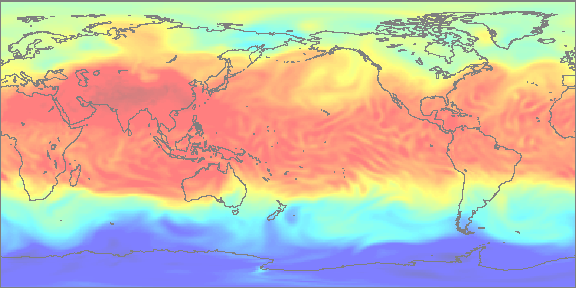
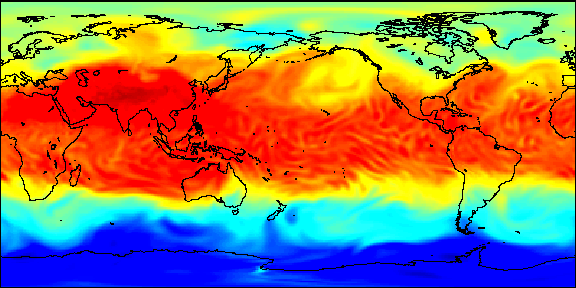
      Let a.ppm be a portable pixmap.
      The following command will normalise its contrast:
	ppmmerge ppmnorm a.ppm > anorm.ppm
BEFORE
AFTER
SEE ALSO
pgmnorm(1), ppmhist(1), ppm(5)
AUTHOR
      Wilson H. Bent. Jr. (whb@usc.edu), heavily based on the pgmnorm filter
      by Jef Poskanzer.