GEMCLIM Summary
1) Set the model environment:
. r.sm.dot gemclim 3.3.2
This opens the access to scripts and model routines of GEMCLIM version
3.3.2.
2) Scripts, executables (absolutes) and config files
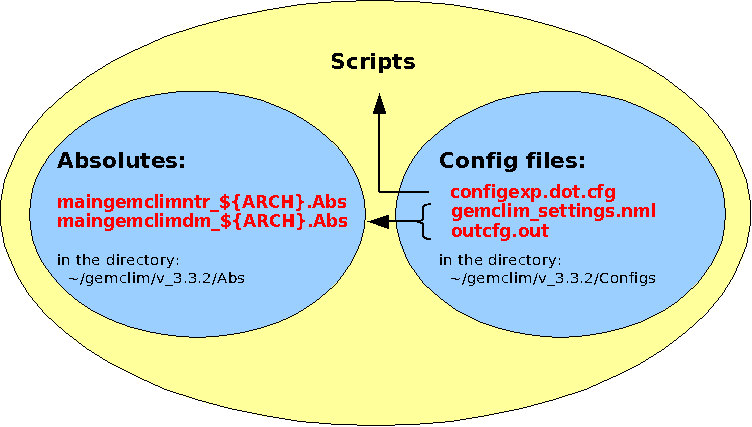
The names of
the absolutes and config files must never be changed!
If you want more than one version put them in different directories.
Absolutes
The GEMCLIM
executables
(one for the entry 'ntr' and
one for the model 'dm') are
created from the whole source code. As long as you do not change the
source code, i.e. modify or add a scheme, you do not have to
recompile them. You can use the same executables for different runs
with different grids, different time periods, using different or
adjusted schemes.
Config files
The config files usually
change from one run to the next. The file 'configexp.dot.cfg' gets read by the scripts,
the files 'gemclim_settings.nml' and
'outcfg.out' get read by the model. In here you specify the
grid, time period, time step, output, and select the schemes you want
to use. You can adjust the schemes in the namelists of the file
'gemclim_settings.nml'.
3) Execution directory
~/MODEL_EXEC_RUN/${mach}/${exp}
This is the directory in which the model runs.
4) Output
- The model writes the
output directly in the directory ${outrep}
as specified in your file 'configexp.dot.cfg'. There will be one set of
files
per output tile; the tile-specific sets can be found in different
subdirectories.
- The post processing is
done in the ${xfer} as
specified in your file
'configexp.dot.cfg'. It reads the model output from ${outrep} and puts its output
(diagnostics and reassembled files) here.
- At the end of a job, once the post processing is finished
reassembled model output and diagnostics get transfered to the archive
directory ${archdir} on the
machine ${arch_mach} as
specified in your
file 'configexp.dot.cfg'.
5) Listings
Most model and script listings will be written into the directory ~/listings/${mach}/*${exp}*. After
the post processing (and after the diagnostics if you requested them)
have finished,
all listings will get zipped and moved into the directory ${archdir} on the machine ${arch_mach} as specified in your
file 'configexp.dot.cfg'.
Author: Katja Winger
Last update: June 2008